

MovieBox APP Download
MovieBox App offers movies, TV shows, subtitles, offline viewing and simple playback features. Learn about MovieBox APK, devices, latest version and more.
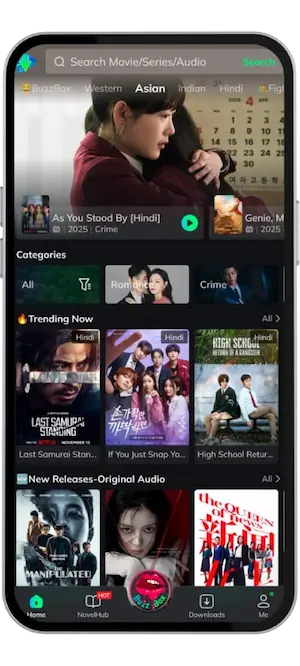
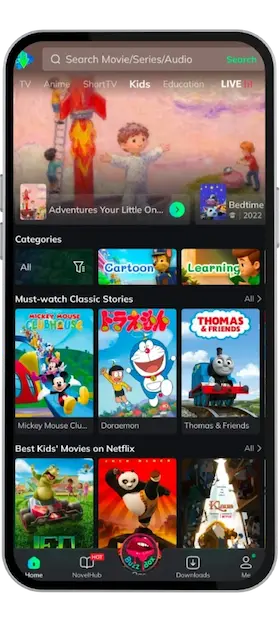
MovieBox is an entertainment app designed for people who want an easy way to browse movies, TV shows, anime, and other video content from one place. The app keeps navigation simple, so users can search for a title, browse different categories, change subtitles, adjust playback settings, or save supported content without going through confusing menus.
The app is mainly used on Android because it is commonly available in APK format. At the same time, users may also want to access it on PC, iPhone, Smart TV, and other devices. This page explains how MovieBox works, its important features, supported platforms, latest version information, MovieBox Pro, older versions, safety points, and common problems.
App Details
| App Information | Details |
|---|---|
| App Name | MovieBox |
| Category | Entertainment |
| File Type | APK |
| Main Platform | Android |
| Price | Free / Version Dependent |
| Latest Version | Check Current Release |
| Android Requirement | Varies by Version |
| Updated | 2026 |
| Main Use | Movies, TV Shows & Entertainment |
What is MovieBox?
MovieBox is a video entertainment application that brings different types of content into one interface. Instead of switching between multiple apps or menus, users can browse available movies, shows, anime, and other entertainment categories from a single place.
The app focuses on easy navigation. Users can search directly by title or use available filters to browse by genre, language, year, or popularity. Depending on the version being used, additional features such as subtitles, offline viewing, watch history, and casting may also be available.
What is MovieBox App?
The mobile application provides a simple interface for browsing and playing supported content. It is designed to give users a mobile-friendly layout with search, playback, content browsing, subtitle controls, and other entertainment features.
The exact experience can change between versions. Some releases may include new interface changes or extra playback options, while older versions may work better on certain devices. Because of this, checking compatibility before installation is important.
What is MovieBox APK?
MovieBox APK is the Android installation package used to install the app manually. APK files are commonly used when an app is not being installed directly through a traditional app store.
Before installing any APK, users should check the file version, Android requirement, source, and permissions. If you only need installation information and the current Android file, visit the MovieBox Download page.
Entertainment Library
The service is mainly known for movies and TV shows, but its content layout may include several other categories as well. Depending on the app version and region, users may see K-Dramas, anime, cartoons, kids content, music videos, sports-related sections, and other entertainment options.
A broad content library is useful only when it is easy to browse, which is why the app also includes search and filtering tools. Instead of scrolling through everything, users can narrow results by category or search directly for a title.
Main Features of the App
Simple and Clean Interface
The interface uses a straightforward layout that keeps important controls easy to find. Search, categories, playback settings, and downloads are usually placed where users can reach them without opening too many menus.
HD Video Playback
Supported content may be available in different video qualities. Users can choose a lower resolution for slower internet or a higher setting when their connection and device can handle it.
Offline Download
Some versions allow supported videos to be saved for offline viewing. This can be useful for users who want to watch later without using mobile data again.
Built-In Subtitles
Subtitle options make foreign-language content easier to watch. Available subtitle languages depend on the selected title and the version of the app.
Multiple Languages
Some releases support more than one interface or subtitle language, which makes the app easier to use in different regions.
Smart Search and Filters
Users can search by title or browse using filters such as genre, year, language, country, or popularity. This makes it faster to reach relevant content.
Watch History and Resume Playback
Watch history can help users find content they recently opened, while resume playback may allow them to continue from where they stopped.
Favorites and Watchlist
Supported versions may also allow users to save movies or shows to a personal list instead of searching for them again.
Chromecast and Screen Casting
Casting support can be useful for users who want to play supported content from their phone on a larger screen.
Dark Mode and Picture-in-Picture
Some versions may include dark mode and picture-in-picture support. These features make the app more convenient for users who watch at night or want to use another app while keeping a small video window open.
Search and Filtering Options
Search is one of the most useful parts of an entertainment app because a large library becomes difficult to use without proper filters. Users may be able to browse by genre, language, country, release year, latest additions, or ratings.
These filters are helpful when users do not know the exact title they want. For example, someone looking for an older action movie can narrow the content by year and genre instead of checking the full library manually.
MovieBox Latest Version 2026
The MovieBox latest version may include changes to performance, search, interface design, device compatibility, and playback controls. New releases can also fix bugs that affected older versions.
However, the newest release is not always the best option for every device. Older Android phones may sometimes work better with a previous version because of hardware limits or Android compatibility. Users in that situation can check the MovieBox Old Version page.
System Requirements
System requirements can change between releases, so users should check the current version before installing. Android version, available RAM, free storage, and internet connection are the main things to consider.
Streaming also depends heavily on connection quality. A slower network may work better with lower video quality, while offline downloads can require much more storage than the app itself.
How It Works
Using the app is generally simple. Open the app, browse available categories, or use the search bar to find a title. After opening a movie or show, users can check available playback quality, subtitles, and other supported options.
If offline viewing is available, supported content can also be saved to the device. Watch history and favorites may help users return to content later without repeating the same search.
MovieBox for Android
Android is one of the main platforms supported by the app because it is commonly distributed as an APK file. Once the APK has been downloaded, users can install it manually if their Android device allows installation from that source.
Compatibility still matters. A newer APK may require a newer version of Android, while older phones may need a previous release. Checking requirements before installation helps avoid unnecessary errors.
MovieBox for PC
Users who prefer a larger screen often search for MovieBox for PC. If a native Windows version is not available, one option is to use an Android emulator.
Programs such as BlueStacks can create an Android environment on a Windows computer. Users can then install the APK inside the emulator and run the application much like they would on a phone. For complete PC instructions, visit the MovieBox for PC page.
The experience depends on the computer and emulator being used. Systems with more RAM and better graphics support usually handle playback more smoothly.
MovieBox for iOS
Android APK files cannot be installed directly on iPhone or iPad. Users searching for MovieBox for iOS should check whether a compatible iOS version or supported installation method is currently available.
It is also important to be careful with unknown configuration profiles or certificates. If you want device-specific information, check the MovieBox for iOS page.
MovieBox for Smart TV
The app can also be useful for people who prefer watching on a larger screen. Android TV devices may support APK installation, but the exact process can be different from a normal Android phone.
Fire TV and Firestick devices use an Android-based system, although controls and compatibility may vary. Some users may also prefer Chromecast or screen casting instead of installing the app directly on the television. Full details are available on the MovieBox for Smart TV page.
Using the App on Mac
Mac users cannot normally install an Android APK directly in macOS. If they want to run the Android version, they may need an emulator that supports their Mac and current macOS release.
Before installing an emulator, users should check its official requirements because support can vary between Intel and Apple Silicon devices.
MovieBox Website and Online Access
People also search for terms such as MovieBox Website, MovieBox Online, and MovieBox Web because some users prefer browser access instead of installing an app.
The browser and app experiences are not always the same. A web version may focus on direct access, while the Android app may include additional device-specific features such as offline viewing, notifications, or playback controls. Available options depend on the service and current version.
MovieBox Pro
MovieBox Pro is another common term users see while searching for MovieBox. It may be connected with versions that are promoted with additional features or a different viewing experience.
Users may come across names such as MovieBox Pro App or MovieBox Pro APK, but the exact features can vary. It is better to check the actual version details instead of assuming that every file carrying the Pro name offers the same options.
MovieBox vs MovieBox Pro
MovieBox and MovieBox Pro may share a similar interface and core purpose, but the features attached to each name can differ by release. Standard versions may focus on basic browsing and playback, while Pro-labelled versions may be promoted with extra options.
Features such as ads, offline downloads, playback quality, and device support can change from one build to another. Because of this, users should compare the actual version information instead of relying only on the name.
MovieBox Mod APK
A MovieBox Mod APK is a modified Android package that has been changed by a third party. These versions may claim to unlock additional features or remove limitations.
Modified files can also create security, privacy, or stability risks because the original code may have been changed. Users should avoid unknown APK sources and should not assume that a modified file is safe simply because it promises extra features.
MovieBox Old Version
Some users prefer an older version when the latest release does not work well on their device. Older builds may use fewer resources, support older Android versions, or have an interface that users already know.
The disadvantage is that older releases may not include newer bug fixes or compatibility improvements. Users should compare both options and choose the one that suits their device. Previous releases can be checked on the MovieBox Old Version page.
Is MovieBox Free?
Some MovieBox-related versions are promoted as free, but available features may vary depending on the version or service being used. Users should check current information before assuming that every feature is included without limitations.
The same applies to Pro or modified releases. A version name alone does not confirm what is actually included in the app.
Is MovieBox Safe?
The safety of an APK depends mainly on where the file comes from and whether it has been modified. Before installing, users should check the file version, review the requested permissions, and avoid downloads from sources they do not trust.
It is also a good idea to keep Android security features enabled. Any APK asking for unrelated permissions or sensitive account information should be treated carefully.
Common Problems and Fixes
MovieBox may sometimes fail to install, open, play a video, or complete an offline download. Installation problems can be caused by low storage, an unsupported Android version, a damaged APK file, or a conflict with an older installation.
Playback issues are often connected to network speed, server availability, or video quality. Lowering the playback resolution may help on slower connections. If subtitles or downloads are not working, check whether the selected content actually supports those features and whether the app has the required permissions.
Data Usage and Storage
Streaming video can use a lot of mobile data, especially when higher resolutions are selected. Users with limited data packages may prefer Wi-Fi or a lower playback quality.
Offline videos can also fill storage quickly. Removing already watched downloads and checking free space regularly can help the app continue working properly.
How to Update the App
Updating MovieBox usually means installing a newer compatible version over the existing app. Before updating, users should check which version is already installed and confirm that the new release supports their Android device.
Where possible, avoid uninstalling the current app first because local settings or saved information may be removed. Update behavior can vary between versions, so backing up important data is always useful.
MovieBox PH and MovieBox BD
Terms such as MovieBox PH and MovieBox BD are often used by people searching from the Philippines and Bangladesh. Availability, language options, and content may vary by region or app version.
Users should focus more on device compatibility and the current release than on the region name alone. A file labelled for one country is not automatically the right choice for every user in that region.
Alternative Apps
Users who cannot run the app on their device may look for other entertainment options with similar functions. Alternatives can differ in content selection, subtitle support, device compatibility, offline viewing, and interface design.
Instead of choosing another app only because it looks similar, compare how it handles privacy, installation, updates, and supported devices.
Pros and Cons
Pros
- Simple and easy-to-use interface
- Quick search and useful filtering options
- Supports movies, TV shows, anime, and other entertainment categories
- Offline download option may be available for supported content
- Built-in subtitle support
- Multiple language options
- Chromecast and screen casting support
- Can work on Android, PC, and some TV devices
- Watch history and resume playback features
- Dark mode and picture-in-picture support may be available
Cons
- APK installation may be confusing for some users
- Features can vary between different versions
- Older devices may face compatibility issues
- High-quality streaming can use more mobile data
- Offline downloads can take a lot of storage
- Some features may not work on every device
- iPhone users cannot install the Android APK directly
- Modified APK files can create privacy or security risks
Frequently Asked Questions
Final Words
MovieBox is designed to make entertainment browsing simple by keeping movies, shows, search tools, subtitles, and playback controls in one place. Its biggest advantage is ease of use, especially for users who prefer a straightforward app without complicated navigation.
Android users usually access MovieBox through an APK, while PC, iOS, Smart TV, and Mac users may need different methods. Before installing any version, always check compatibility, file details, and permissions so that the app matches the device you are using.